

Requirements As Artifacts
An artifact is a uniquely identifiable object complemented with metadata that describes its attributes. If a requirement is labeled with a unique ID and supplemented with additional attributes, it effectively becomes an artifact—it could be stored in a database and queried. However, not all requirements are managed as artifacts. Some requirements are not standalone objects, they cannot be referenced, and a relationship to other requirements cannot be created. In the following example, the "Select Existing Customer" wizard step requirement is an artifact that has attributes and is stored in the requirements repository. On the other hand, the requirement for paging is just a note, so it is not an object, it cannot have attributes, and cannot be traced to other requirements.
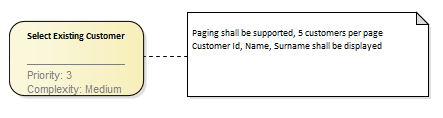
For small projects or projects where requirements are clear and stable, requirements could be managed as a bullet list or in a simple Excel sheet. However, when the number of requirements is large or when the project applies formal requirements management, it might be necessary to record requirements in a repository as objects so that it is easier to generate requirements reports and trace requirements to other artifacts.
Requirements Granularity
Requirements are never a flat list of "System shall" statements. Some are more general than others, so they typically form hierarchies—trees of requirements, with each level holding requirements of a different level of detail:

The question is, which levels of requirements should be stored in the requirements repository as objects. In the example above, all requirements are represented as identifiable objects, so granularity is high in this case. They all have a unique ID such as "REQ1-1-1", they all could hold additional attributes, and they could be automatically processed—it is possible to query them, export them, or track relationships between them. In general, the more granular requirements are, the more automation could be applied because even the smallest requirements are represented by an object and hence can hold additional attributes. However, it comes at a price. The average project could contain hundreds of requirements, and managing each of them separately as an object would present enormous overhead. Therefore, the goal is to capture requirements in the most lightweight form, which still enables you to track the information you need in a given situation. In practice, not all requirements need to be stored as objects in a database. If all child requirements come from one stakeholder, are going to be implemented in the same release, and share the same attributes, there is no point in storing them as objects and adding complexity. The analyst should choose an approach that best meets the needs of a particular project.
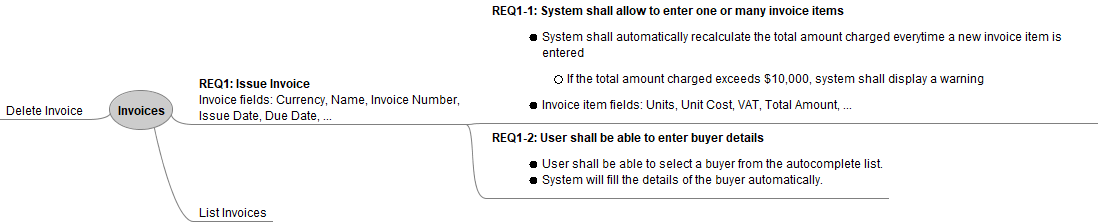
The requirements hierarchy above holds the same information as the previous one, but in this case, only half of the requirements are objects with an ID; the rest are captured in the form of a note. Such a setup is more lightweight, presents less maintenance overhead, yet is still sufficient for this project.
Requirement Attributes
Think of requirement artifacts as objects with properties. These objects have a textual description and also attributes that specify their characteristics. They can be stored in a document, in a spreadsheet, or in some kind of database. Of course, storing them in tabular form instead of documents has advantages, as it is possible to query, sort, and filter them—for example, it is possible to filter all "Requirements which were created in 03/2018" and sort them by the author's name. The amount of metadata should be selected in accordance with the needs of a particular project: for example, if all requirements are requested by a single stakeholder, it does not make sense to record the "Author" attribute for every requirement. Similarly, if the project is done in one phase, filling a "Phase" attribute is a pure waste of time. The following table shows the most common requirement attributes:
| Attribute | Description |
|---|---|
| Date Created | When the requirement was created |
| Author | The person who created the element |
| Status | The stage at which the requirement is (for example, proposed or verified) |
| Priority | Indicates which requirement should be implemented first |
| Difficulty/Complexity | More complex means bigger effort |
| Origin | Can be a stakeholder name, reference to a requirements workshop, etc. |
| Due Date/Phase/Release | Requirements don't need to be implemented in one go. Indicates product version, release, or just the date when it needs to be implemented |
| Stakeholders | Stakeholders who contribute to the requirement or are affected by it |
| Rationale | Why this requirement is included |