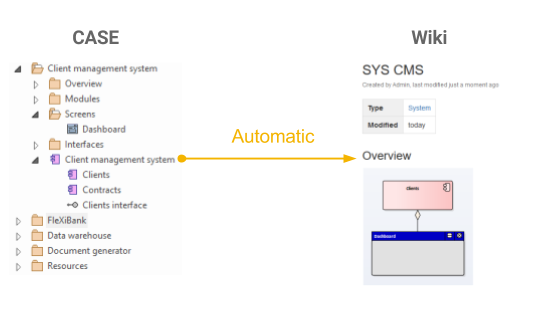

CASE + Wiki
In the previous chapter, we explained why we are not fans of storing documentation in separate word processor documents, even though it remains a common practice among companies. For this reason, we will focus only on the two remaining options: storing documentation in a CASE tool and in enterprise wiki software.
CASE
(+) Pros
- Each artifact is a unique object stored in the database.
- Relationships between objects are also stored in the database (useful for analyzing the impact of changes).
- Models do not own the contained elements—elements are only referenced, which allows reusing them instead of duplicating them.
- Everything is stored in one place.
- Searching is fast due to the underlying database.
- Objects can be exported as data files.
- It is possible to automatically generate textual documentation from the repository. As a result, multiple outputs can be generated without duplicating information, as all outputs come from the same data source.
(-) Cons
- CASE tools lack the advanced text editing features of word processors, such as rich text formatting, inserting attachments, or version history. This is very limiting for analysts.
- Generating textual outputs from the repository is possible but not straightforward. It requires someone with the skills to create and maintain templates.
- The specification generated from a CASE tool is basically just another offline document with all the downsides mentioned in the previous chapter.
- Because CASE tools excel at modeling but are weak at textual descriptions, analysts using only CASE tools tend to prefer creating a model even when a couple of sentences would suffice. This wastes time.
Wiki
(+) Pros
- Advanced text editing and formatting features.
- Supports collective ownership and collaboration:
- Easily accessible to anyone with permission.
- Easy to learn and simple to use.
- Sharing is straightforward.
- Includes versioning and a change log.
- Access management—possible to restrict access to certain parts.
- Global search functionality.
- Flexible documentation structure.
(-) Cons
- Documentation is text-based—it is not possible to manage relationships between artifacts or export data.
- Updating diagrams:
- Every time a diagram changes, it needs to be exported and updated across all pages.
- This is often addressed by using plugins to draw diagrams directly in the wiki, but this approach does not work for models created in a CASE tool.
Hybrid Approach
The previous comparison shows that selecting either approach comes with significant disadvantages, as each method excels only in one specific area. But what if they could be combined so that the advantages remain while the disadvantages vanish? This is possible if each tool is used only for what it was designed to do: CASE for modeling, and a wiki for documentation and collaboration. The resulting hybrid approach then has the following characteristics:
- Agility
- Easy to access for anyone, no software installation needed.
- Collaboration
- Anyone can edit the documentation; editing is intuitive.
- Easy sharing via links.
- Advanced text formatting
- Headings, images, tables, hyperlinks, etc.
- Documentation management
- Versioning and change logs.
- Global search.
- Notifications.
- Comments.
- Unified knowledge base
- All information is stored in one place.
- A unified look and feel is achieved by using predefined templates.
- All artifacts stored in a single repository
- All artifacts are stored as unique objects in the database along with their relationships.
- It is easy to search for objects, export them in various data formats, and track relationships between them.
- Modeling
- Ability to visually model various organizational components.
- The results are actual models that reuse objects from the repository, not just standalone drawings.
- Automation
- Automatic diagram updates.
- Automatic documentation format checks.
- Automatic corrections.
Middleware
Combining a CASE tool with a wiki leverages the advantages of both approaches and eliminates their disadvantages. However, separating data (the CASE repository) from its documentation (wiki pages) introduces a major challenge. Since each artifact essentially has two representations, they must be synchronized:
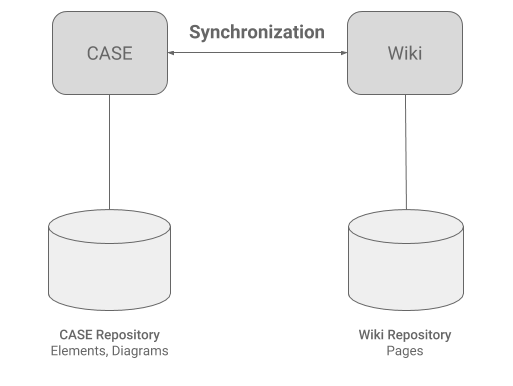
If an artifact or a relationship changes in the repository, its documentation in the wiki becomes outdated and must be synchronized. To remain effective, these repetitive "corrections" must be automated to avoid the hassle of manually changing everything in two places. This means introducing a "man in the middle"—a software tool running the routine synchronization work:
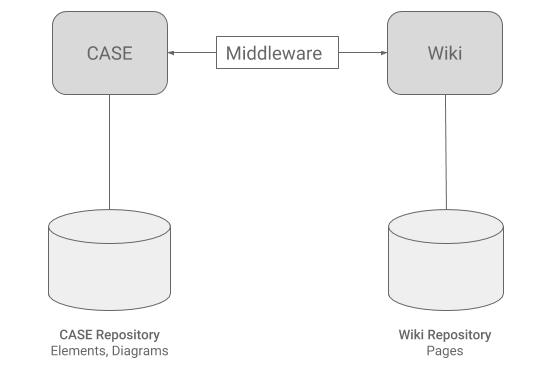
Such an architecture allows combining both worlds and taking advantage of both. On one hand, there is a repository of artifacts and their relationships, which is easy to manage, allows searching, exporting, modeling, and performing "database-like" queries. On the other hand, textual specifications are managed in modern enterprise wiki software, which offers rich text editing features and advanced documentation management capabilities: