

Analysis Tips and Practices
There is a wide range of skills that professional analysts must possess, but truly effective individuals know they need something more to quickly grasp a problem, stay organized, and communicate smarter. This chapter provides several practical tips to improve an analyst's day-to-day routines and make their analysis efforts more effective.
Learning the Domain
A business analyst is expected to serve as a partner for stakeholders, helping them find solutions to their needs and driving organizational change. To achieve this, business analysts must understand the domains in which their company operates. Even though some analysts specialize in a single domain, it is more common for them to switch domains—either by changing companies or moving within the same organization. Large organizations operate in multiple areas, and analysts must often be ready to jump into projects in different domains or handle initiatives that span across several areas. For example, in a bank, an analyst might be assigned to a project dealing with mortgages and then asked to help find a solution for credit cards once the mortgage project wraps up.
Of course, analysts aren't expected to know everything from day one, as long as they can learn along the way. However, stakeholders often lack the patience to wait. They know their processes and systems from A to Z and can find it difficult to look at them through the eyes of a newcomer. They will use their own terminology, refer to familiar processes or systems, and unconsciously talk about problems as if they were speaking to their peers. It is not that they don't want to slow down and explain things simply; they just find it hard to do so. For this reason, analysts need to catch up fast and prepare in advance to gain the required knowledge and confidence. An analyst must be on track from the very first minute to avoid missing vital facts and to build good relationships with stakeholders. It is impossible to build respect and trust with stakeholders without knowing the basics of their work. One great approach is to ask for business training and software demonstrations before the actual analysis begins to get a feel for the problem and learn the terminology. Meeting all stakeholders face-to-face beforehand is also highly beneficial, though not always feasible.
Understanding the Context
Although "the devil is in the details," to avoid that devil, we first need to understand how the whole system works. An analyst must grasp the high-level context before diving into specifics. Is it clear what the real need behind a requirement is? Has the business purpose of the application to be built been clarified? If a part of a process is changing, do we know what the entire process looks like? Looking at a problem from one or two levels above can reveal interesting side effects that might significantly influence the final design of the solution.
a) Forget the IT Side
As mentioned in the previous tip, it is very hard for stakeholders not to dive straight into the details, which complicates attempts to understand the context of a problem. One way to prevent this is to ask stakeholders to describe what they need to achieve without mentioning IT systems. This keeps their focus purely on the business steps without getting bogged down by implementation details. The goal is not to ignore technical information, but simply to postpone gathering it until the overall context of the problem is clear.
b) Start With the Process
The context of a problem strongly depends on its nature. If a requirement asks to change the flow of steps in an application, the context is very likely a use case. If the problem is that incorrect data is being saved to a database, the entire data route must be mapped to identify which application might be corrupting it. For most business-level problems, the context is a process. All of these examples share one attribute: the context is essentially a sequence of steps that represent a "process," just at different levels of abstraction.
A process is the best way to define the context of a problem. Knowing what comes before a modified step and what follows it provides a big picture, giving the analyst certainty that no part of the chain has been ignored and all impacts have been discovered. A process is a great starting point for learning the current state and a highly effective way to capture the future state.
Example
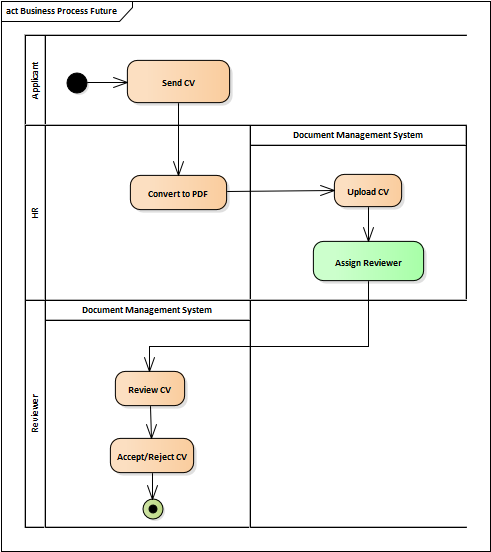
The following diagram depicts the process of assessing incoming CVs. After a CV is received, the HR officer converts it to a PDF and uploads it to the Document Management System (DMS), where it is reviewed. In the old version of the process, the reviewer was automatically assigned by the DMS, which proved to be inefficient. The analyst has been asked to change the process so that the HR officer can manually assign the best reviewer for each CV:
Knowing the context of a required change enables analysts to look at the problem from a broader perspective and identify more complete solutions. What's more, having such a high-level model offers additional advantages:
- It streamlines how changes are presented to stakeholders. The model clearly demonstrates what is changing and how each party will be affected.
- It allows changes to be presented to multiple parties at the same time while keeping the meeting organized, as each group can focus only on their specific part of the process.
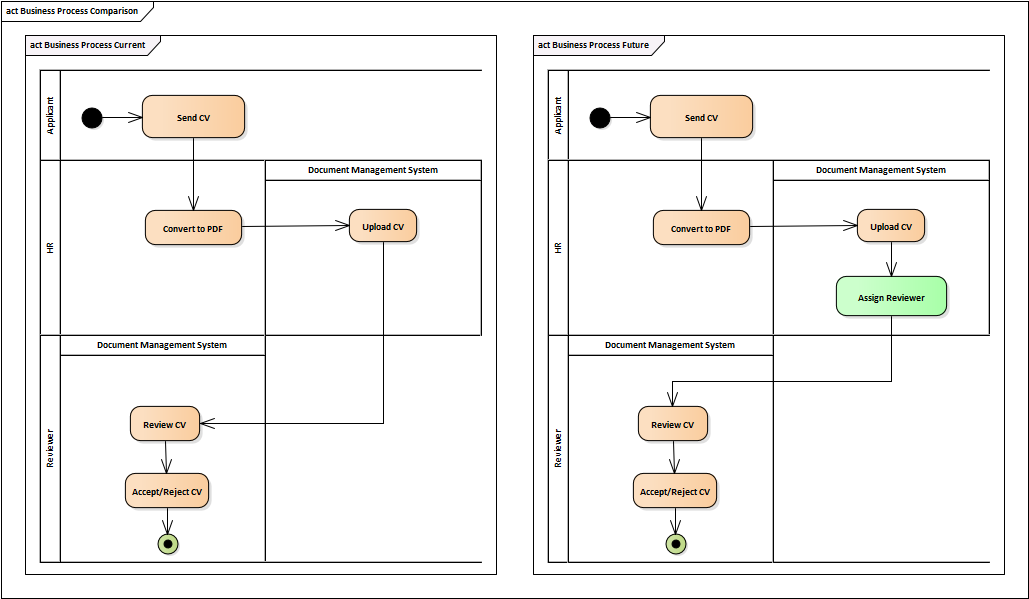
- The current and future states can be easily compared by presenting them side-by-side.
Hands-on Experience
We sometimes see analysts who have solid knowledge of a process and know who performs individual steps and when, but their knowledge is purely theoretical. They were told how the process works, but they have never actually tried it themselves. They have never talked to the people who really carry out the tasks, blindly relying instead on high-level information from managers. Seeing the actual screens and trying out the system alongside real users is usually a game-changer. Analysts instantly start looking at the problem differently; everything suddenly becomes more concrete and clear, and they become far more productive.
Does it sound strange that someone would start analyzing a system without even seeing it? In business analysis, this is more common than you might think. When analyzing the impacts of changes on a complex business process involving five or six different systems, it is simply impossible to simulate every scenario in a reasonable timeframe. It might not even be feasible to see all parts of the process in live applications, as the process may be so complicated that running it end-to-end across all systems would take more time than the actual analysis. On the other hand, you don't need to simulate everything. The best advice here is to insist on seeing at least the main parts of it live. Teaming up with someone who knows the systems well—like testers or system specialists—is an excellent approach, as they can simulate basic scenarios to help the analyst grasp how everything works together. Another option is to ask end-users directly to show how they use the systems in production. This is fantastic because it lets analysts see how real users perform tasks day-to-day, though unlike testers, regular users cannot easily simulate every edge-case scenario. The ideal approach is to combine both methods.
Mapping Both the Future and Current State
Analysts always look ahead because, even though they first need to understand the current need, their primary job is to find the future solution to that need. The solution is basically a specification of what will be created or changed down the road—be it a system, a process, or even an entire branch of the enterprise. The future state is essential since project managers and developers aren't interested in how things work right now; they need to know what they are expected to deliver later.
Stakeholders, however, look at it slightly differently. They first need to select the best solution to implement by assessing the alternatives provided by the analyst. This involves understanding exactly what each alternative will change, how it will affect the way they work today, and what value it will deliver. For this reason, it is also crucial for them to understand the current state. Comparing solution alternatives with the current state helps them understand the context, see the main modifications, and justify decisions.
Learning to Be Structured
One of the greatest values a business analyst brings is the ability to take a big, tangled ball of information, untangle it, and hand back several smaller balls sorted by color. It is a well-known fact that humans struggle with analyzing massive problems. Our brains are far more effective at processing smaller chunks of information compared to huge amounts of data, so every analyst must learn to break down complex problems into smaller pieces. When introduced to a complex issue, you first need to identify the best way to split it up, which helps you analyze it piece by piece. There is never just one way to slice a problem, and there is no hard rule on how large or small the pieces should be. It all depends on the problem itself, the purpose of the analysis, and who will be receiving the information.
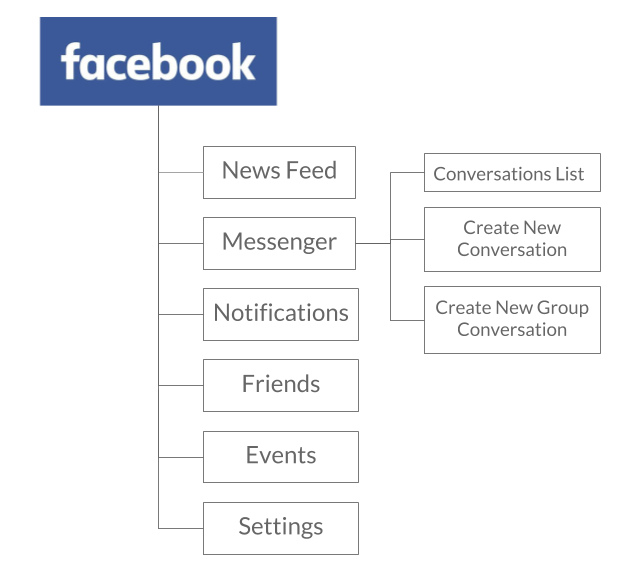
The following example demonstrates breaking down a large entity into smaller subcomponents, which helps in understanding a complex system by analyzing its individual parts:
Having a High-Level Picture
Once a problem is identified and successfully broken down into smaller pieces, the next step is to visualize it. Throughout a project, you will need to introduce the problem to various people from both the business and IT sides. Stakeholders and the development team all need to learn the basics and understand the context of what they are building and why, which is best achieved using a visual overview. The diagram can depict impacted business areas, the future version of a business process, a comparison of the current and future states, a project timeline, or a context diagram. Having an initial diagram like this is incredibly handy for introducing the problem to people and highlighting the boundaries and scope of the project. It acts as the "elevator pitch" for your analysis effort.
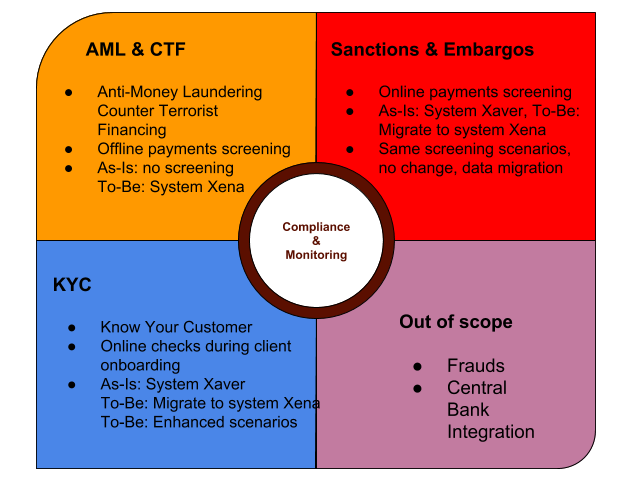
The following example shows an overview of payment and client monitoring in a bank. It provides a high-level summary of which checks are in scope, the purpose of each check, and which systems are responsible for running them.
Such a picture helps an analyst introduce the domain to people highly effectively, ensuring everyone starts with the same foundational knowledge. This diagram should be posted publicly (on a project home page, for instance) so anyone can refresh their memory on the basics at any time.
Having a Map
The concept of creating an overview of a problem or solution can also be applied to the analysis process itself or the entire project. A typical project contains a massive amount of information scattered across various tools. Some details live in documentation, while others are found in issue trackers, communication logs, or business cases. This makes it difficult to patch together a high-level view of the current status of the analysis to recall critical decisions, upcoming deadlines, or major open points. While the information exists somewhere, scrolling through 40 pages of text and diagrams every time you need a quick refresh is incredibly inefficient. For this purpose, a mind map is an excellent tool. It can pull together key facts like crucial deadlines, contacts, or open points into one convenient, visual place.

However, because this approach requires duplicating information between the primary storage and the map, it should be used wisely, and the overhead must be justified.
Keeping a Communication Log and Task List
On larger projects, the sheer volume of administrative and logistical information will eventually exceed what you can comfortably keep in your head. You simply can't remember every promise made to stakeholders, everything they pledged to deliver, or where the email thread supporting a key decision is located. Because of this, it is best to set up a communication log and a task list right from the start.
- Communication Log: This includes all critical conversations, both incoming and outgoing. Not every detail ends up in an official document, and even if it's sitting in an inbox, having a distilled, searchable summary is much more efficient. It can track what someone requested from you or the project, along with the respective responses.
- Task List: This tracks the status of smaller, day-to-day tasks that aren't substantial enough to be logged in formal project management software.
Preferring Face-to-Face Communication
Analyzing systems, processes, or business needs is complex enough on its own; that complexity shouldn't be compounded by relying on indirect communication, which increases the risk of misunderstandings. Emails or instant messages are slow, and written text can easily be misinterpreted, so face-to-face or phone communication should always be preferred. Another crucial aspect is that analysts need to work hard to earn the trust of stakeholders. This can't be achieved over email, which isn't personal enough to deepen professional relationships. To become a true partner, stakeholders need to know the analyst personally. This holds true even in environments where everything must be formally recorded for audit trails; the only difference is that the analyst should always send out a quick summary of what was agreed upon during the verbal meeting.
Avoiding Offline Documents
The days of writing documents, emailing them around for review, and manually copying stakeholders' comments back into a master file are over. We live in the era of modern collaboration tools like online office suites and wikis, meaning there is no longer any need to send files back and forth when you can simply share a link. While it might not always be easy or possible to implement depending on corporate policies, analysts should always try to establish a single, shared space for information that enables real-time collaboration.